Template Management
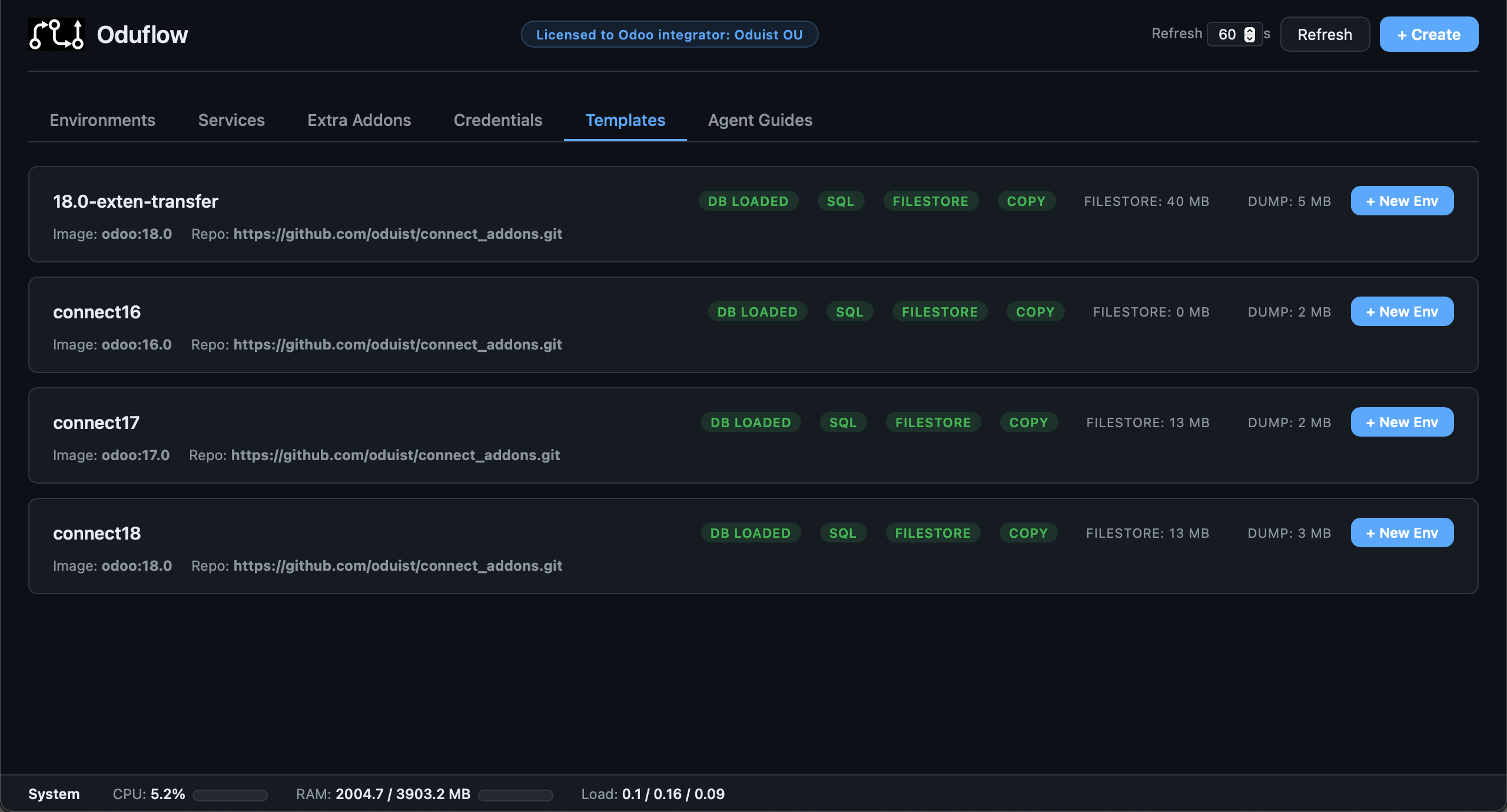
Templates are the foundation of Oduflow's instant environment creation. A template consists of a PostgreSQL dump file and an optional filestore directory.
Create templates from production dumps, staging snapshots, or from scratch. Maintain multiple named templates side-by-side (e.g. per Odoo version, per client, per project phase) and spin up any combination of branch + database in seconds.
Starting from Scratch (No Production Dump)
If you don't have a production database dump — for example, you're starting a new Odoo project or just want to try Oduflow — you can generate a clean template automatically.
Generate a clean template
If a dump.sql or filestore already exists, the command will refuse to run. Use --force to overwrite:
This will:
- Start a PostgreSQL container (if not already running)
- Run a temporary Odoo container that initializes a fresh database with the
basemodule - Dump the database to
{data_dir}/team_{ID}/templates/{name}/dump.pgdump - Extract the filestore to
{data_dir}/team_{ID}/templates/{name}/filestore/ - Load the dump into the template database automatically
Install additional modules during generation
oduflow init-template --odoo-image odoo:19.0 --template-name default --modules base,web,contacts,sale
Named templates for different projects
oduflow init-template --odoo-image odoo:19.0 --template-name myproject-v19
oduflow init-template --odoo-image odoo:15.0 --template-name legacy-v15
From a Production Dump
Place your dump file at {data_dir}/team_{ID}/templates/default/dump.sql (plain SQL) or dump.pgdump (PostgreSQL custom format) and optionally copy the filestore:
mkdir -p /srv/oduflow/team_1/templates/default/
cp /path/to/production.sql /srv/oduflow/team_1/templates/default/dump.sql
cp -r /path/to/filestore/ /srv/oduflow/team_1/templates/default/filestore/
oduflow reload-template default
Saving a Branch as Template
When you've made significant changes in a branch environment (installed modules, created configurations), you can save it as the new template:
oduflow template-from-env my-branch --template-name default
oduflow template-from-env my-branch --template-name myproject  # save to a named template
This operation:
- Dumps the branch database to a new template dump file
- Reloads the template database from the new dump
- Snapshots the branch's merged filestore
- Unmounts the overlay filesystems of other active environments on this template (keeping their
upperdeltas) - Replaces the template filestore with the snapshot
- Remounts those overlays against the new baseline, preserving each environment's filestore changes by default
- Restarts the affected containers
The source environment is always reset to the new baseline (its data just became the template). Other environments keep their filestore changes (the overlay upper layer) — this is non-destructive by default. Their existing files shadow the new template (env-local edits win); files they deleted stay deleted; new template files show through.
To instead discard other environments' changes and reset them to the clean new baseline:
Note
--reset-env-changes is destructive: other environments lose their filestore deltas. Without it, their changes are preserved.
Copy-mode templates
Environments created from a small (copy-mode, use_overlay=false) template have an independent filestore copy, not an overlay. They are not affected by template filestore updates and are left untouched.
Refreshing Template Overlays
Re-apply a template's current on-disk filestore to all live overlay environments without re-importing or re-saving — non-destructive by default (each environment keeps its upper deltas):
oduflow refresh-template default
oduflow refresh-template default --reset-env-changes   # discard env deltas (destructive)
Use this after changing the template filestore on disk, or to re-sync an environment that was busy/skipped during an import or save.
Database Dump and Separate Filestore
Production backups are often delivered as two artifacts: a database dump first and a filestore archive or directory later. Use this flow when you imported a template with --without-filestore, or when a manual backup gives you the database and filestore separately.
# 1. Import the database only from a running Odoo instance
oduflow import-template https://my-odoo.example.com master_password \
  --db-name odoo19-mirage \
  --template-name prod \
  --without-filestore

# 2. Attach the filestore when it is available
oduflow attach-filestore prod /backups/odoo19-mirage-filestore.zip

# 3. Create environments from the complete template
oduflow call create_environment '{"branch":"dev","template_name":"prod"}'
attach-filestore replaces the template's filestore and updates metadata.json (includes_filestore, filestore_size_mb, and use_overlay). It does not reload the database.
Supported sources:
# Local archive; entries like odoo19-mirage/60/<sha1> are normalized to 60/<sha1>
oduflow attach-filestore prod /backups/odoo19-mirage-filestore.zip

# Local directory
oduflow attach-filestore prod /backups/odoo19-mirage/filestore

# Remote rsync over SSH
oduflow attach-filestore prod odoo@example.com:/srv/odoo/.local/share/Odoo/filestore/odoo19-mirage

# rsync daemon URL
oduflow attach-filestore prod rsync://backup.example.com/odoo/filestore/odoo19-mirage
Archives may be .zip, .tar, .tar.gz, .tgz, .tar.bz2, .tbz2, .tar.xz, or .txz. Local directories and remote sources are copied with rsync -a --delete, so rsync must be installed on the Oduflow host and reachable over SSH for user@host:/path sources.
Oduflow detects the wrapper prefix automatically by looking for Odoo filestore paths shaped like XX/<40-character sha1>. For example, an archive containing odoo19-mirage/60/609e7ca59cc05bf0de7233c6781a381b742a2931 is installed as filestore/60/609e7ca59cc05bf0de7233c6781a381b742a2931. If a source has multiple possible wrappers, pass the prefix explicitly:
oduflow attach-filestore default /backups/filestore.zip --strip-prefix odoo19-mirage
oduflow attach-filestore default /backups/filestore.zip --strip-prefix none
Like template-from-env, this is non-destructive for live overlay environments by default: Oduflow remounts them against the new template filestore while preserving their upper changes. Pass --reset-env-changes only when you intentionally want those environments reset to the new baseline. Copy-mode environments are independent copies and are not changed by attaching a new template filestore.
Reloading a Template
Update the template from a newer production dump without touching the filestore:
oduflow reload-template default --dump-path /path/to/new.dump
oduflow reload-template myproject --dump-path /path/to/new.dump
Syncing from S3 or Local Path
Use --source to sync both the dump file and filestore from an external source before reloading:
# Sync from S3
oduflow reload-template default --source s3://mybucket/prod/

# Sync from local path
oduflow reload-template default --source /backups/prod-latest/

# Cron-friendly (suppress info logging)
oduflow reload-template default --source s3://mybucket/prod/ --quiet
The source directory should contain dump.pgdump (or dump.sql) and optionally filestore/. Files are synced using aws s3 sync (S3) or rsync (local), then the template DB is reloaded.
Non-destructive for live environments
When --source replaces the template filestore, live overlay environments on that template are automatically unmounted and remounted against the new lower layer, keeping their filestore changes. import-template creates a new template and refuses an existing template name.
Listing and Dropping Templates
# List all template profiles with their status
oduflow list-templates

# Delete a template profile (removes DB + files from disk)
oduflow delete-template myproject
Template Metadata
Each template profile can contain a metadata.json file that stores defaults and configuration:
{
  "odoo_image": "odoo:19.0",
  "repo_url": "https://github.com/company/addons.git",
  "extra_addons": {"enterprise": "19.0"},
  "env_vars": {"WORKERS": "2", "LIMIT_TIME_CPU": "600"},
  "use_overlay": true,
  "source_url": "https://my-odoo.example.com",
  "source_db": "production",
  "odoo_version": "19.0+e",
  "pg_version": "15.0"
}
When create_environment is called with a template name, repo_url, odoo_image, and extra_addons are automatically loaded from metadata if not explicitly provided. This means after importing or configuring a template, you can create environments with just branch and template_name — all other parameters are inherited.
Environment variables
env_vars holds {"NAME": "value"} pairs injected into the Odoo container of every environment created from the template — the same mechanism as the env_vars argument of create_environment, but recorded once on the template instead of being repeated at each call. Saving a template from a live environment (save_as_template) carries that environment's variables over automatically.
The two sets are merged per key, with the values passed at creation time winning:
# Template records WORKERS=2 and LIMIT_TIME_CPU=600
oduflow call create_environment '{
  "branch": "19.0",
  "template_name": "default",
  "env_vars": "WORKERS=8"
}'
# Container gets WORKERS=8 (overridden) and LIMIT_TIME_CPU=600 (inherited)
Edit them in the dashboard under Templates → Settings → Environment variables (one KEY=VALUE per line), or directly in metadata.json. Names must be valid shell identifiers ([A-Za-z_][A-Za-z0-9_]*); the dashboard rejects anything else on save, and a hand-edited file with an invalid entry is ignored with a warning rather than blocking environment creation.
Variables set here are applied on top of the database connection variables (HOST, USER, PASSWORD) that Oduflow injects itself, so reusing those names overrides the connection settings.
The use_overlay flag determines whether new environments use fuse-overlayfs (for large filestores) or a simple copy (for small ones). It is set automatically based on overlay_threshold_mb (in [storage]) when the template is created.
Template Decision Matrix
| Scenario | Command |
|---|---|
| New project, no existing database | oduflow init-template --odoo-image odoo:19.0 --template-name default |
| Regenerate template from scratch | oduflow init-template --odoo-image odoo:19.0 --template-name default --force |
| Named template for a specific project | oduflow init-template --odoo-image odoo:19.0 --template-name myproject |
| Have a production dump file | Place dump at {data_dir}/team_{ID}/templates/default/dump.sql and run oduflow reload-template default |
| Need to install modules or configure the template | Create an env, configure it, then oduflow template-from-env my-branch --template-name default |
| Update the template from a newer production dump | oduflow reload-template default --dump-path /path/to/new.dump |
| Sync template from S3 and reload | oduflow reload-template default --source s3://bucket/prod/ |
| Save a branch environment as template (keep other envs' changes) | oduflow template-from-env my-branch --template-name default |
| Save a branch as template and reset all other envs | oduflow template-from-env my-branch --template-name default --reset-env-changes |
| Re-apply a template's filestore to live envs | oduflow refresh-template default |
| Attach a separately delivered filestore | oduflow attach-filestore default /backups/filestore.zip |
| List all templates | oduflow list-templates |
| Delete a template | oduflow delete-template myproject |