Auxiliary Services
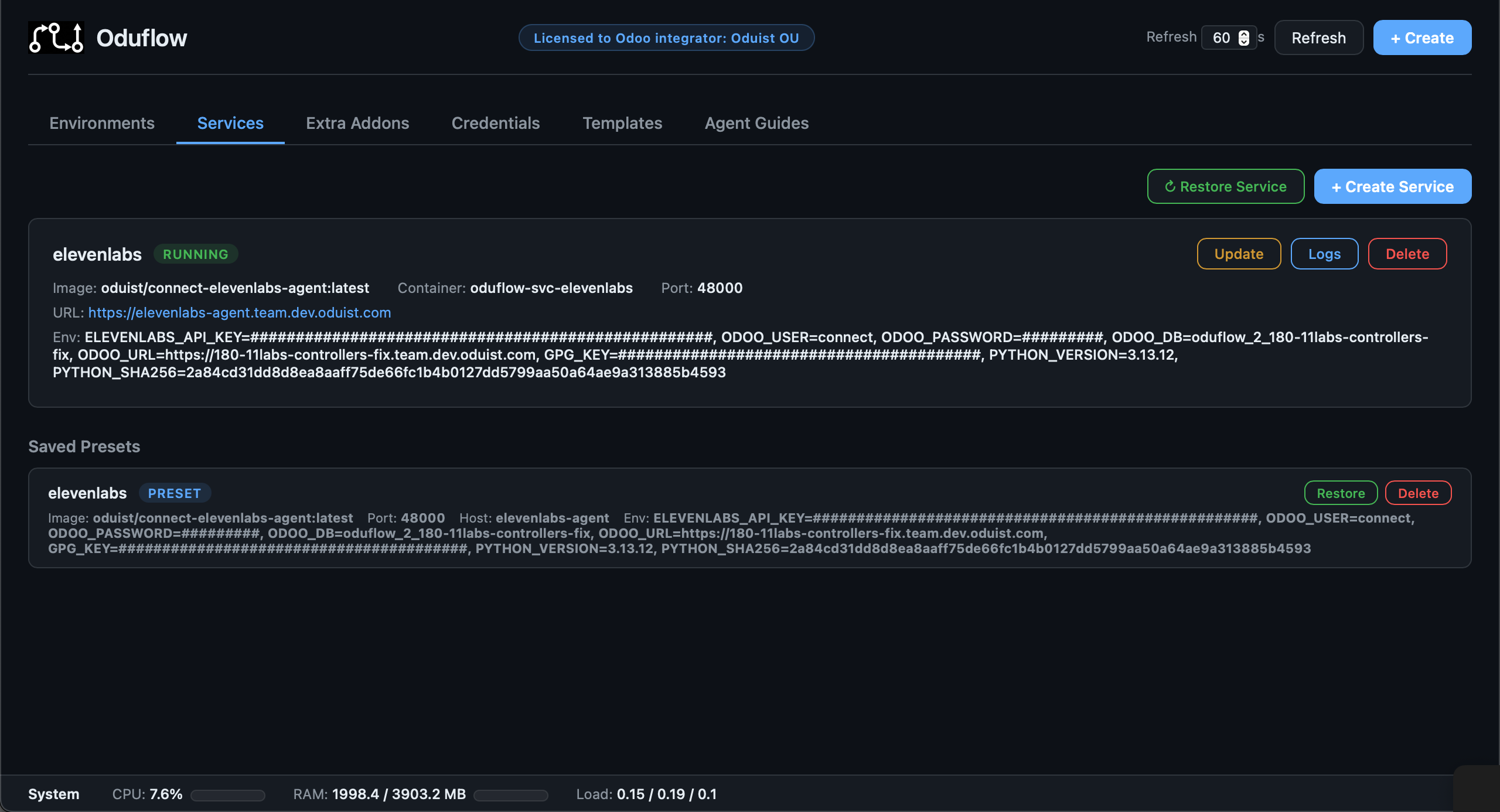
Oduflow can manage sidecar containers for auxiliary services your Odoo instance depends on — Redis, Meilisearch, Elasticsearch, RabbitMQ, or any other Docker-based service.
Creating a Service
# Redis
oduflow call create_service redis redis:7 6379

# Meilisearch with environment variables. A value "secret:<name>" references a
# write-only team secret set in the dashboard — see Security → Secrets.
oduflow call create_service meilisearch getmeili/meilisearch:v1.6 7700 "" "MEILI_MASTER_KEY=secret:meili-master-key,MEILI_ENV=production"

# Elasticsearch
oduflow call create_service elasticsearch docker.elastic.co/elasticsearch/elasticsearch:8.11.0 9200 "" "discovery.type=single-node,ES_JAVA_OPTS=-Xms512m -Xmx512m"

# MinIO — the image expects its start arguments as the container command
oduflow call create_service '{"name":"minio","image":"minio/minio","port":9000,"command":"server /data"}'

# WireGuard VPN — needs NET_ADMIN to manage tun/iptables
oduflow call create_service '{"name":"vpn","image":"linuxserver/wireguard","port":51820,"net_admin":true}'

# Publish only selected HTTP prefixes, each on its own backend port
oduflow call create_service '{
  "name":"fs",
  "image":"oduist/freeswitch:latest",
  "hostname":"fs",
  "host_mode":true,
  "routes":[
    {"path":"/RPC2","port":8080,"strip_prefix":false},
    {"path":"/portal","port":8080,"strip_prefix":false}
  ]
}'
Services are:
- Attached to the team's isolated Docker network
oduflow-{team_id}-net(reachable by that team's Odoo containers and other services) - Given an
unless-stoppedrestart policy - Automatically routed through Traefik with HTTPS when in traefik mode
- In Traefik TLS mode, automatically given the exact system mount
oduflow-traefik-acme:/etc/traefik:ro - Labeled for management (
oduflow.managed=true,oduflow.service=<name>) - Always created from a freshly pulled image —
create_serviceandrestore_serviceexplicitly pull before running, so mutable tags like:latestget the current published version instead of a stale local cache
Each team has service_slots = 10 by default. The cap includes running and
stopped managed services; updating or restarting an existing service does not
consume another slot. Delete an unused service to free capacity, or set
service_slots = 0 to disable the cap.
Connecting from Odoo
Inside the team's Docker network the service is reachable by its container
name — the DNS name is exactly oduflow-{team_id}-svc-{name} (e.g.
oduflow-1-svc-redis). There is no shorter alias such as redis or
oduflow-svc-redis. This is precisely the Container: / Internal hostname:
value that create_service and get_service_info report, so configure Odoo
against that:
The URL: line printed by the service tools is the external Traefik/host
address, not the internal one — do not use it for in-cluster connections.
host_mode services are not on the team network, so they are not resolvable by
container name; reach them via host.docker.internal instead.
Restricted HTTP Path Routes
In Traefik mode, routes can replace the single catch-all port. Each route
publishes a URL prefix on the service's hostname and forwards it to another
HTTP port of the same service. This works in both networking modes:
- Bridge services are reached on their private IP in the team's Docker network.
host_modeservices are reached throughhost.docker.internal.
Routes are prefix matches on path-segment boundaries: /api accepts /api and
/api/..., but not /apix. When routes are present Oduflow does not create the
hostname-only catch-all router, so every unlisted path receives Traefik's 404
without reaching the service. Set strip_prefix=true when the backend serves
from /; Traefik then sends /portal/assets/app.js as /assets/app.js and
adds X-Forwarded-Prefix: /portal.
routes is intentionally not an arbitrary reverse-proxy configuration: a route
contains only path, port, and optional strip_prefix, and always targets the
same managed service. It is available only with [routing].mode = "traefik".
Raw TCP/UDP protocols cannot be routed by URL path.
Traefik Certificate Store
When Oduflow terminates TLS through Traefik, every auxiliary service can read
Traefik's certificate store at /etc/traefik/acme.json. The mount is implicit:
do not add oduflow-traefik-acme to the volumes argument, and do not mount a
different volume at /etc/traefik. Oduflow always mounts the exact system
volume read-only; there is no wildcard allowance for other oduflow-* volumes.
The implicit mount is runtime configuration and is not saved in the service
preset.
This deliberately makes the shared certificate and private-key material readable to every service container. Use only trusted service images and grant service-management access only to trusted operators. Read-only protects the store from modification, not from disclosure.
Start Command
Some images ship an ENTRYPOINT that expects arguments, and their default
CMD is not what you want (minio/minio needs server /data, for example).
The optional command replaces the image CMD:
oduflow call create_service '{
  "name":"minio",
  "image":"minio/minio",
  "port":9000,
  "command":"server /data --console-address :9001"
}'
The string is split with shell quoting rules, so --address ":9001" stays one
argument; the resulting argv is what get_service_info reports and what the
preset stores. The image ENTRYPOINT is never changed. Leave command out to
run the image's own CMD.
On update_service the parameter is tri-state: omitted keeps the current
command, a new string replaces it, and an empty string drops the override
so the container falls back to the image CMD. (This differs from env_vars
and image, where an empty value means "keep".)
# Change the command
oduflow call update_service '{
  "name":"minio",
  "command":"server /data --console-address :9090"
}'

# Drop it and use the image default again
oduflow call update_service '{"name":"minio","command":""}'
Linux Capabilities
Two optional flags grant additional container privileges:
net_admin— adds theNET_ADMINLinux capability. Required for VPN / WireGuard,tun/tapdevices, andiptablesmanipulation inside the container.privileged— runs the container in privileged mode (full host access, all capabilities). Use with care — only when a service genuinely needs it (e.g. Docker-in-Docker, hardware passthrough).
Both can be enabled at the same time; on the Docker side, privileged implies all capabilities so net_admin is then redundant — but it is still recorded in the preset so disabling privileged later keeps NET_ADMIN active.
Managing Services
# List all services with status, ports, URLs, and env vars
oduflow call list_services

# Full state of a single service — image + digest, port/routes, hostname,
# host_mode, command, volumes, env vars, capabilities, restart count,
# started_at, preset
oduflow call get_service_info redis

# View service logs
oduflow call get_service_logs redis 200

# Restart a service
oduflow call restart_service redis

# Update a service (pull latest image, recreate container with same settings)
oduflow call update_service meilisearch

# Change environment variables on a running service (fully replaces existing env_vars)
oduflow call update_service '{"name":"meilisearch","env_vars":"MEILI_MASTER_KEY=newkey,MEILI_ENV=production"}'

# Change the image (tag) of a running service
oduflow call update_service '{"name":"meilisearch","image":"getmeili/meilisearch:v1.8"}'

# Toggle Linux capabilities / privileged mode on a running service (recreates it)
oduflow call update_service '{"name":"wireguard","net_admin":true}'
oduflow call update_service '{"name":"wireguard","privileged":true}'

# Delete a service
oduflow call delete_service redis

# Execute a command inside a service container
oduflow call run_service_command redis "redis-cli ping"
Changing a Service
update_service is the preferred way to change any setting of a running service — image, env vars, port/routes, hostname, host_mode, command, volumes, privileged, or net_admin. It recreates the container automatically and preserves every setting you do not override, so you rarely need to delete and recreate a service by hand. Passing routes fully replaces the route list. To return to a single catch-all port, pass routes=[] and the replacement port in the same call.
In the dashboard, Update on a service card opens a dialog prefilled with the service's current environment variables (from its preset, or from the container for a service created before presets). Edit them and confirm to apply the change and pull the latest image in one go; leave the field untouched to just pull and recreate, or clear it to remove every variable. The other settings are changed over MCP or the CLI.
If you do recreate a service manually (e.g. to rename it), call get_service_info first and reuse its fields in the new create_service call. The returned dict carries the full configuration (image, port or routes, hostname, env_vars, host_mode, command, volumes, cap_add, privileged) so you do not lose anything that list_services truncates or that lived only inside the preset.
Service Update Flow
The update_service operation:
- Reads the saved preset (authoritative source) or inspects the running container as a legacy fallback
- Applies any overrides passed in (
env_vars,image,port/routes,hostname,host_mode,command,volumes,privileged,net_admin) — each override fully replaces the current value - Resolves the complete candidate volume configuration before touching the running container; invalid or missing volumes fail without stopping it
- Pulls the target image (the override, or the current one)
- Decides whether to recreate:
- If neither the image digest nor any setting changed → reports "already up-to-date"
- If the image digest changed, any setting was overridden, or a legacy Traefik TLS service lacks the implicit ACME mount → stops the old container, removes it, and creates a new one with the merged settings
- Updates the saved preset so subsequent
restore_servicecalls use the new configuration
Overrides are optional: calling update_service with only name pulls the current image and recreates only when its digest changed or the implicit ACME mount is missing.
Service Presets
Every time a service is created, its configuration (image, port or routes, hostname, environment variables, volumes, host_mode, command, cap_add, privileged) is automatically saved as a preset in {team_data_dir}/service_presets.json. This allows you to restore a service after deletion without re-entering its configuration.
# List saved presets
oduflow call list_service_presets

# Restore a previously deleted service
oduflow call restore_service redis

# Remove a saved preset
oduflow call delete_service_preset redis
Container lifecycle settings
MCP/REST create_service and update_service accept a runtime mapping.
It is also available on Stack services. Supported keys are tmpfs (only /run,
/run/lock, /tmp), cgroupns: private, stop_signal (SIGTERM or
SIGRTMIN+3) and stop_timeout (1–3600 seconds). For example:
{
  "tmpfs": {"/run": "rw,nosuid,nodev,mode=755", "/tmp": "rw,nosuid,nodev,mode=1777"},
  "cgroupns": "private",
  "stop_signal": "SIGRTMIN+3",
  "stop_timeout": 240
}
In Stack manifests the keys follow the manifest-wide camelCase convention
(stopSignal, stopTimeout); the snake_case spellings shown above are also
accepted there.
Updates preserve these settings when omitted; {} clears the explicit overrides.
Presets and stack planning retain them. Stop/restart/replacement honors the old
container's timeout so changing an image does not truncate its shutdown grace
period. These settings do not grant privileges or make a systemd image healthy: an
image must implement its own readiness check, and its cgroup/capability requirements
must be verified on the deployment host. The runtime field does not accept
arbitrary Docker options or bind mounts from the host.