Authentication & Security
MCP HTTP Auth
When auth_token is set for a team in oduflow.toml, the MCP endpoint (/mcp) requires a Bearer token:
Authorization: Bearer <your-token>
Each team can have its own auth token:
[team.1]
auth_token = "secret-token-team-1"

[team.2]
auth_token = "secret-token-team-2"
The token is used to both authenticate and identify the team. This is implemented via FastMCP's StaticTokenVerifier.
GitHub OAuth (for Claude.ai and other MCP clients)
Oduflow supports GitHub OAuth 2.1 for MCP clients that use OAuth authorization (e.g. Claude.ai Remote MCP, MCP Inspector). This allows users to authenticate via their GitHub account instead of static tokens.
Setup
-
Create a GitHub OAuth App:
- Authorization callback URL:
https://your-server.com/auth/callback - Note the Client ID and Client Secret
- Authorization callback URL:
-
Configure
oduflow.toml:
[server]
oauth_client_id = "Ov23li..."
oauth_client_secret = "your-github-client-secret"
oauth_base_url = "https://your-server.com"
- (Optional) Restrict access to specific GitHub users per team:
[team.1]
github_users = ["octocat", "dev1"]

[team.2]
github_users = ["admin2"]
If github_users is not set in any team and there is only one team, all authenticated GitHub users get access. If github_users is set, only listed users can access the MCP server — others get 403 Access Denied.
Connecting from Claude.ai
- Go to Claude.ai Settings → Integrations → Add Remote MCP Server
- Enter your oduflow URL:
https://your-server.com/mcp - In Advanced Settings, enter the GitHub OAuth App Client ID and Client Secret
- Claude will redirect you to GitHub for login, then connect to oduflow
Combined mode (static tokens + OAuth)
Both auth methods can work simultaneously. Static Bearer tokens are checked first; if no match, the OAuth flow is used:
[server]
oauth_client_id = "Ov23li..."
oauth_client_secret = "abc..."
oauth_base_url = "https://your-server.com"

[team.1]
auth_token = "secret-token"         # for CLI / automation
github_users = ["octocat", "dev1"]  # for Claude.ai / browser-based clients
GitHub username in MCP context
When a user authenticates via GitHub OAuth, their GitHub login is available in the MCP tool context. This can be used for audit trails and environment metadata (e.g. "created by octocat").
Web Dashboard Auth
The web dashboard and REST API use HTTP Basic authentication with a separate password:
- Username:
admin - Password: value of
ui_passwordfromoduflow.toml
This is independent from the MCP Bearer token (auth_token). Credentials are compared using hmac.compare_digest to prevent timing attacks.
When auth is disabled
MCP auth and Web UI auth are configured independently per team:
- If
auth_tokenis empty, the MCP endpoint runs without authentication - If
ui_passwordis empty, the web dashboard runs without authentication
Warnings are logged on startup for each team:
INFO [team.1] http://localhost:8000/ (MCP token OFF, OAuth OFF, UI auth OFF)
Git Credentials
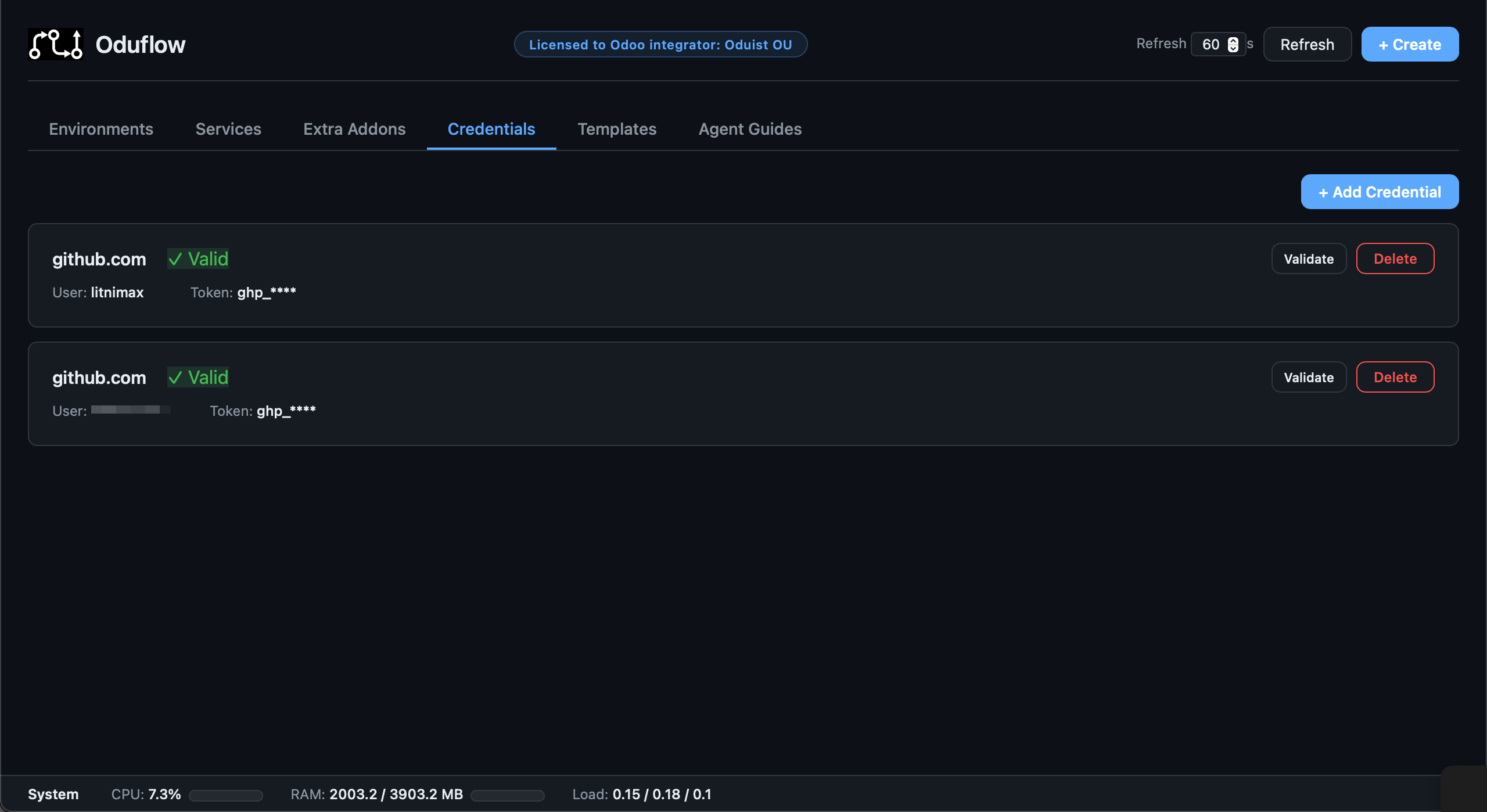
Private repository credentials are stored in the git credential store at {team_data_dir}/.git-credentials (per-team) via the setup_repo_auth tool. The clean URL (without credentials) is always used in Docker labels and logs — credentials are never exposed.
Managing credentials via MCP
# Store credentials for a private repository
oduflow call setup_repo_auth https://user:PAT@github.com/owner/private-repo.git
The tool parses the URL, stores the credentials, and verifies access by running git ls-remote.
Managing credentials via REST API and Web Dashboard
The Web Dashboard and REST API provide full credential lifecycle management:
| Action | REST API |
|---|---|
| List all stored credentials | GET /api/credentials |
| Add credentials for a repository | POST /api/credentials/add (body: repo_url) |
| Delete a stored credential | POST /api/credentials/delete (body: host, username) |
| Validate a credential against the provider | POST /api/credentials/validate (body: host, username) |
Validation checks the credential against the provider's API (GitHub, GitLab, Bitbucket). For other hosts, it reports "valid" if the credential exists. Tokens are always masked in API responses (e.g. ghp_****).
iptables rule
On startup, an iptables ACCEPT rule is automatically added for the oduflow-net Docker bridge interface. This ensures that containers on the shared network can communicate with the host (required for Traefik host.docker.internal routing and PostgreSQL access). If iptables is not available, the rule is skipped with a warning.
Odoo security defaults
The bundled odoo.conf template includes these security settings:
admin_passwdset to a random value (prevents database manager access)list_db = False(hides database selector)without_demo = all(no demo data)max_cron_threads = 0(disables cron in dev environments)